
What Is a Dedicated Server and Why It Is Needed
Before moving to practical use, let us first clarify the key terms. If you have encountered phrases such as server for rent, rent dedicated server, or dedicated server USA, they all refer to renting a physical server located in a data center and fully allocated to one client. Unlike virtual servers (VPS), a dedicated server does not share its resources with anyone else. All CPU power, RAM, storage, and network bandwidth belong only to you and are available 24/7. You can review the detailed configurations and conditions on the official service page: https://deltahost.com/dedicated.html
In simple terms, imagine renting an entire house instead of just a room. When you rent a room, you depend on your neighbors: their noise, their usage of utilities, and their habits. When you rent the whole house, you control everything. A dedicated server works the same way — it provides stability and predictability because no external users can affect its performance.
How Dedicated Servers Are Used in Modern Life
In real life, choosing to rent dedicated server solutions is common in several scenarios. For example, if you run an online store with growing traffic, especially during promotions or seasonal sales, stable performance becomes critical. A dedicated server allows your website to handle many visitors at the same time without slowing down.
Another common case is business software, accounting systems, or internal corporate platforms. Such systems require constant availability and secure data storage. A dedicated server ensures that sensitive information is isolated from other users.
Gaming projects are another practical example. When you host a game server for dozens or hundreds of players, virtual servers often fail under load. A dedicated server is like owning your own sports hall instead of renting one hour per day — it is always available and performs consistently.
If we compare this to transportation, VPS hosting is similar to public transport, while a dedicated server is your personal car. Public transport is cheaper, but you depend on schedules and other passengers. Your own car costs more but gives you control, comfort, and reliability.
Pricing and Rental Conditions
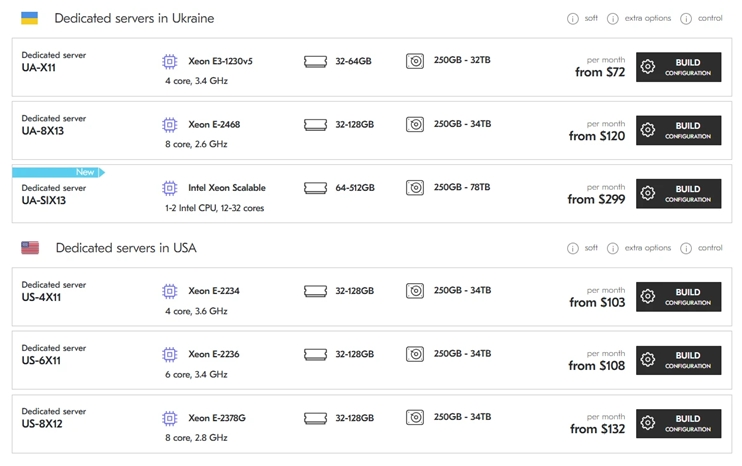
On the DeltaHost page, you will find ready-made dedicated server configurations that can be selected based on your needs and budget. https://deltahost.com/dedicated.html
Pricing depends on hardware power. For example, entry-level servers with fewer CPU cores and moderate RAM are suitable for small business projects, while more powerful configurations are designed for high-load platforms.
This is similar to renting equipment: basic tools are cheaper, but professional equipment costs more because it can handle heavier tasks. The same logic applies to a server for rent — the more resources you need, the higher the price, but also the higher the stability and performance.
Technical Characteristics Explained in Simple Terms
When choosing a rent dedicated server option, it is important to understand what the main technical parameters affect.
Processor (CPU)
The CPU determines how many tasks the server can process at the same time. More cores mean better multitasking. You can compare this to a kitchen: one cook can prepare one dish at a time, while several cooks can serve many clients simultaneously.
RAM (Operational Memory)
RAM defines how many processes the server can keep active without slowing down. If RAM is insufficient, the system starts to lag. This is like trying to work efficiently while constantly forgetting important information — more memory makes everything smoother.
Storage (SSD or HDD)
SSD storage provides much faster data access than traditional HDDs. For websites and applications, this means faster loading times. It is similar to using a high-speed elevator instead of climbing stairs — both get you to the destination, but the speed and comfort differ greatly.
What Knowledge Is Required to Manage a Server
If you decide not only to rent a dedicated server but also to manage it yourself, it is important to understand that a server is not just a “computer that works somewhere on the internet.” It is more like a separate technical workspace that requires regular attention. Managing a server means you are responsible for its stability, security, and performance. Below, each required area of knowledge is explained in simple terms.
Understanding Linux or Windows Server Systems
First, you need a basic understanding of the operating system installed on the server. Most dedicated servers use Linux (Ubuntu, Debian, CentOS, AlmaLinux) or Windows Server.
Linux servers are commonly used for websites, databases, APIs, and application hosting. You should understand how to connect to the server using SSH, how to navigate directories, manage users, and control services. This is similar to learning how to drive a manual car — at first it seems complex, but once you understand the logic, you gain full control.
Windows Server is often chosen for software that depends on Microsoft technologies, such as MSSQL, ASP.NET, or remote desktop environments. Here, knowledge of Remote Desktop access, system roles, and basic Windows administration is required. This is more like driving an automatic car — easier to start, but still requiring understanding of rules and controls.
If you compare this to renting an apartment, the operating system is the layout of your home. You must know where the switches, water valves, and fuse box are before you can live comfortably.
Ability to Install and Configure Software
A server is useful only when it runs the right software. You need to know how to install and configure web servers (such as Nginx or Apache), databases (MySQL, PostgreSQL), and application environments (PHP, Node.js, Python).
This includes setting correct ports, file permissions, and service configurations. Even small mistakes can cause a website or application to stop working. Think of this like assembling furniture: having all the parts is not enough — you must follow the instructions carefully so that the final result is stable and safe.
You also need to understand how different services interact. For example, a website depends on a web server, a database, and background processes. If one component fails, the entire system may be affected. This is similar to a restaurant kitchen: the chef, the stove, and the ingredients must all be available for the restaurant to operate smoothly.
Basic Networking and Security Skills
Networking knowledge is essential because a server is constantly connected to the internet. You should understand IP addresses, ports, firewalls, and basic routing. This helps you control who can access your server and how.
Security is especially important. You must know how to:
- Configure a firewall
- Use secure passwords or SSH keys
- Protect the server from unauthorized access
- Understand basic DDoS and brute-force protection
Ignoring security is like leaving your house with the door unlocked. Everything may seem fine until something goes wrong. A well-configured server protects your data, your users, and your reputation.
You do not need to be a cybersecurity expert, but you should understand the fundamentals well enough to prevent common threats.
Backup and Update Management
Finally, you must understand how to create and manage backups and perform system updates. Backups ensure that your data can be restored if something fails — hardware problems, software bugs, or human mistakes.
A good backup strategy includes regular automated backups and storing copies in a separate location. This is similar to keeping copies of important documents in both your home and a safe deposit box.
Updates are equally important. Operating systems and software receive security patches and performance improvements. If updates are ignored, vulnerabilities accumulate, and the server becomes an easy target for attacks. However, updates must be done carefully, preferably with backups in place, to avoid breaking compatibility.
Managing backups and updates means thinking ahead, not just reacting to problems. This is what separates a stable server from one that constantly fails.
Summary
Managing a server on your own requires a combination of technical understanding, responsibility, and planning. You need to know how the operating system works, how to install and connect software components, how to protect your server on the network level, and how to keep your data safe through backups and updates.
If this feels overwhelming, managed server services are a practical alternative. They allow you to focus on your business or project while professionals take care of the technical side. However, if you are willing to learn, managing your own server gives you full control and flexibility — much like owning a house instead of renting a serviced apartment.
If this seems complex, managed services are available. This means specialists handle configuration, security, and maintenance for you. It is like renting an apartment with maintenance included — you focus on living and working, not on technical issues.
Server Location and Why It Matters
When choosing a dedicated server USA, server location plays an important role. Physical location affects response time and user experience. Servers located in the USA are ideal for projects targeting North American audiences, as they provide faster data transfer and lower latency.
This is similar to opening a store closer to your customers. The closer you are, the faster and more convenient the service. The same principle applies to servers — proximity improves performance.
Conclusion
A dedicated server (server for rent, rent dedicated server, including dedicated server USA) is a reliable solution for projects that require high performance, stability, and full control over resources. On the page https://deltahost.com/dedicated.html, you can find various configurations suitable for different business and technical needs.
If you are an entrepreneur, developer, or project owner working with high traffic, databases, or critical applications, a dedicated server allows you to operate without limitations imposed by shared environments. It is a practical investment in performance, security, and long-term growth.
Media Contact
Company Name: Delta Host
Email: Send Email
Country: Ukraine
Website: https://deltahost.com/