
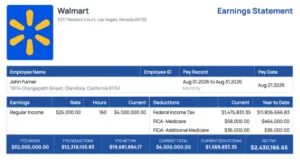
A paystub is a document that shows how much an employee earned during a specific pay period, what taxes and other deductions were taken out, and how much money the employee actually received. Also known as a pay stub, paycheck stub, or earnings statement, it provides a detailed breakdown of an employee’s compensation, including gross pay, net pay, payroll taxes, benefits, and year-to-date earnings.
Paystubs help employees understand their paychecks, review deductions, and maintain accurate income records. Employers use them to communicate payroll information, while employees may need them when applying for a loan, renting an apartment, or verifying employment.
Whether you are an employee reviewing your paycheck or a small business owner preparing payroll, understanding how a paystub works makes it easier to manage earnings, taxes, and financial records.
What Is a Paystub Used For?
A paystub serves as a record of how an employee’s wages were calculated. Although the most obvious purpose is to explain a paycheck, the document can also be useful in financial, employment, and tax-related situations.
Income verification: Banks, landlords, and lenders may request recent paystubs to confirm an individual’s income and employment details. Depending on the institution, additional documents may also be required.
Payroll transparency: Employees can review their regular wages, overtime earnings, bonuses, tax withholding, and benefits deductions. This makes it easier to identify unexpected changes between pay periods.
Tax preparation: Paystubs contain information about federal income tax withholding, state income taxes, Social Security, and Medicare contributions. Year-to-date figures can help employees review their payroll information throughout the year, although a paystub does not replace official annual tax documents.
Financial planning: Knowing your net pay allows you to build a realistic monthly budget. It also makes it easier to estimate how much money will be available after regular expenses.
Employment records: A paycheck stub can help document an employee’s wages, working hours, overtime payments, and other compensation details.
For employers, keeping accurate payroll information is also important for recordkeeping and compliance with applicable employment laws.
What Information Is Included on a Paystub?
Although paystub layouts vary depending on the employer, payroll system, and state requirements, most contain similar information. Understanding these sections will help you read a paystub without getting confused by unfamiliar terms.
Employee and Employer Information
The first section generally identifies the employee receiving payment and the employer issuing it.
Employee information may include the person’s full name, employee ID, address, and a masked Social Security number. Employer information typically includes the company’s legal name and business address.
These details help connect the payment record to the correct employee and organization.
Pay Period and Payment Date
The pay period identifies when the employee performed the work covered by the paycheck. The payment date shows when the employee is scheduled to receive their earnings.
Employers may operate under different payroll schedules, including weekly, biweekly, semimonthly, and monthly payments.
For example, an employee might have a pay period running from September 1 through September 14, with a payment date of September 18.
The pay period and payment date are not necessarily the same because employers need time to process payroll.
Gross Pay
Gross pay is the total amount an employee earns before payroll taxes and other deductions are subtracted.
For hourly employees, gross wages typically depend on the number of hours worked and the applicable hourly rates. Salaried employees generally receive a predetermined amount for each pay period, although bonuses or other earnings can change that total.
Gross pay may include regular wages, overtime compensation, commissions, bonuses, and other taxable earnings.
Payroll Taxes and Deductions
A paycheck stub also shows amounts withheld from an employee’s earnings.
Common payroll deductions include federal income tax, applicable state and local income taxes, Social Security, Medicare, health insurance premiums, and retirement contributions.
Some deductions are mandatory, while others depend on the employee’s benefits and elections. Certain contributions are taken from pre-tax earnings, while others are deducted after taxes.
Because deductions differ by employee, two workers with the same gross salary may receive different net payments.
Net Pay
Net pay, sometimes called take-home pay, is the amount the employee receives after applicable taxes and deductions have been subtracted.
The general calculation is:
Net Pay = Gross Pay – Total Employee Deductions
For example, if an employee earns $2,500 in gross wages and has $550 in total deductions, their net pay is $1,950.
Net pay is especially important when planning household expenses because it represents the money actually available to spend or save.
Year-to-Date Earnings
Year-to-date, commonly abbreviated as YTD, shows accumulated earnings and deductions from the beginning of the calendar year through the current pay period.
A paystub may show YTD gross earnings, federal taxes withheld, Social Security contributions, Medicare taxes, and net pay.
These totals are useful when checking how much you have earned throughout the year or comparing payroll records with your annual Form W-2.
What Does a Paystub Look Like?
A paystub typically contains employee and employer information, pay period dates, earnings, tax deductions, and a summary of gross and net pay. Most paystubs also include year-to-date (YTD) amounts, allowing employees to track their cumulative earnings and deductions throughout the year.
Below is an illustrative paystub example showing how these details are organized.
Example Paystub
Employer: Example Retail LLC, Las Vegas, Nevada Employee: John Smith, Glendora, California Pay period: Aug 01, 2026 to Aug 31, 2026 Pay date: Sep 04, 2026
Earnings
| Earning | Rate | Hours | Current |
| Regular Income | $25.00 | 160 | $4,000.00 |
Taxes / Deductions
| Taxes / Deductions | Current | YTD |
| Federal Income Tax | $450.00 | $3,600.00 |
| FICA – Social Security | $248.00 | $1,984.00 |
| FICA – Medicare | $58.00 | $464.00 |
| FICA – Additional Medicare | $0.00 | $0.00 |
Summary
| YTD Gross | YTD Deductions | YTD Net Pay | Current Total | Current Deductions | Net Pay |
| $32,000.00 | $6,048.00 | $25,952.00 | $4,000.00 | $756.00 | $3,244.00 |
This paystub is a fictional example for educational purposes. Actual federal and state taxwithholding depends on employee circumstances and applicable payroll regulations.
In this example, the employee earned $4,000 in gross pay during the current pay period. After $756 in payroll deductions, the employee received $3,244 in net pay. The YTD figures represent cumulative earnings and deductions across eight illustrative pay periods.
Paystub Abbreviations
Paystubs often contain abbreviations that can be difficult to understand, particularly for employees receiving their first paycheck. These shortened terms help payroll providers fit detailed financial information into a compact document.
Here are some of the most common paystub abbreviations and their meanings.
| Abbreviation | Meaning | Explanation |
| YTD | Year to Date | Cumulative totals for the current year |
| REG | Regular Pay | Earnings from standard working hours |
| OT | Overtime | Compensation for qualifying overtime hours |
| DT | Double Time | Earnings paid at twice the regular rate, when applicable |
| GROSS | Gross Pay | Total earnings before deductions |
| NET | Net Pay | Take-home pay after deductions |
| FIT or FITW | Federal Income Tax Withholding | Federal income tax deducted from wages |
| SIT or SITW | State Income Tax Withholding | State income tax deducted from wages |
| FICA | Federal Insurance Contributions Act | Payroll taxes supporting Social Security and Medicare |
| OASDI | Old-Age, Survivors, and Disability Insurance | Social Security tax |
| MED | Medicare | Medicare payroll tax |
| SS | Social Security | Social Security payroll withholding |
| 401(k) | Retirement Plan Contribution | Employee retirement savings contribution |
| HSA | Health Savings Account | Contribution to an eligible medical savings account |
| FSA | Flexible Spending Account | Contribution to a qualifying benefits spending account |
| PTO | Paid Time Off | Paid leave balance or related compensation |
| EE | Employee | Amount associated with the employee |
| ER | Employer | Amount associated with the employer |
| DD | Direct Deposit | Electronic payment to a bank account |
| GARN | Garnishment | Legally required withholding for an obligation |
Payroll abbreviations are not completely standardized. For example, one payroll provider might use “SOC SEC” for Social Security, while another uses “OASDI.”
Similarly, an employer-paid benefit may appear on a paystub for informational purposes without reducing the employee’s net pay.
If an abbreviation is unclear, employees should ask their employer or payroll department for an explanation rather than assume what the deduction represents.
How to Read a Paystub Correctly
Reading a paystub becomes easier once you understand the relationship between earnings, deductions, and take-home pay.
Begin by checking your name, pay period, and payment date. Confirm that the statement belongs to you and covers the correct work dates.
Next, review the earnings section. Hourly employees should compare the hours and rates against their time records, including any overtime. Salaried employees should check that the expected salary and additional compensation are listed correctly.
Then examine the deductions. Federal and state income tax withholding, retirement contributions, and benefits costs may change depending on personal circumstances or payroll elections.
Finally, subtract total employee deductions from gross pay to verify the reported net pay. If the figures do not match, check whether the statement includes additional earnings, reimbursements, adjustments, or employer contributions displayed separately.
Why is checking your paystub important? Even a small payroll error can affect several pay periods before anyone notices. Reviewing each statement helps employees identify incorrect working hours, missing overtime, unexpected deductions, or other discrepancies earlier.
Gross Pay vs. Net Pay: What’s the Difference?
Gross pay and net pay describe two different stages of an employee’s compensation.
Gross pay represents earnings before deductions. Net pay represents the money the employee actually receives after deductions.
| Feature | Gross Pay | Net Pay |
| Definition | Total earnings before deductions | Earnings after deductions |
| Includes Taxes | Before employee taxes are subtracted | Employee withholding already subtracted |
| Used For | Compensation reporting and payroll calculations | Budgeting and take-home income |
| Also Called | Gross earnings or gross wages | Take-home pay |
| Amount | Usually higher | Usually lower |
For example, an employee with a $60,000 annual gross salary does not necessarily receive $5,000 in their bank account each month. Their actual take-home income depends on payroll taxes, benefits, retirement contributions, and other applicable deductions.
Another important distinction is taxable wages. Gross pay and taxable wages are not always identical because certain pre-tax benefits or retirement contributions may reduce the amount subject to particular taxes.
How to Calculate Paystub Deductions
Calculating a paycheck involves more than multiplying hours by an hourly wage. Employers must also determine which taxes and benefits apply to each employee.
Federal Income Tax
Federal income tax withholding generally depends on the employee’s Form W-4, taxable wages, pay frequency, and applicable IRS withholding methods.
There is no single federal income tax percentage that applies to every employee. Withholding varies according to individual circumstances and payroll information.
Social Security Tax
For 2026, the employee Social Security tax rate is generally 6.2% of covered wages, subject to the annual Social Security wage base limit of $184,500.
For example, an employee with $2,000 in Social Security taxable wages would generally have $124 withheld for Social Security, assuming they remain below the wage base limit.
Medicare Tax
The standard employee Medicare tax rate is 1.45% of Medicare taxable wages, with no annual wage base limit.
An employee with $2,000 in Medicare taxable wages would generally contribute $29 toward Medicare.
An additional 0.9% Medicare tax withholding applies when an employer pays an employee more than $200,000 in Medicare wages during a calendar year.
State and Local Income Taxes
State tax withholding depends on the employee’s work location, applicable state law, and individual tax circumstances.
Some states do not impose individual income taxes on wages, while others use flat or graduated income tax systems. Certain local jurisdictions also impose their own income taxes.
Employers should calculate these amounts using the rules that apply to the relevant payroll period and jurisdiction.
Pre-Tax and Post-Tax Deductions
Pre-tax deductions may reduce taxable wages before one or more taxes are calculated. Examples can include certain retirement contributions, eligible health insurance premiums, and qualifying HSA contributions.
Post-tax deductions are generally taken from earnings after the applicable taxes have been calculated. These can include certain insurance payments, Roth retirement contributions, and other authorized deductions.
The tax treatment depends on the specific benefit and applicable rules. A deduction that reduces federal income taxable wages does not necessarily reduce wages subject to Social Security or Medicare.
Step 6: Calculate Net Pay
Once all applicable deductions have been determined, calculate the amount payable to the employee.
For example:
Gross Pay: $950
Total Employee Deductions: $210
Net Pay: $740
The final amount should match the payment being issued to the employee, with any non-wage reimbursements or other adjustments handled appropriately.
Step 7: Review and Generate the Paystub
Check all employee information, pay dates, wages, and deductions before issuing the statement.
The total earnings should reconcile with the payroll calculation, and the final payment amount should match the payroll payment record.
After verifying the figures, generate the earnings statement in an appropriate format, such as a printable PDF. An online paystub generator can help organize the information into a readable document, but the underlying figures still need to be accurate.
Businesses should retain the supporting payroll records required by law and provide employees with access to their pay information according to applicable requirements.
A paystub must represent genuine payroll activity. Creating a document with invented earnings, false employment information, or fabricated deductions is not an acceptable substitute for legitimate income records.
How to Get a Paystub From Your Employer
Employees can usually access their paystubs through their employer’s payroll system.
Many businesses use online payroll portals that allow employees to sign in, review payment history, and download individual paycheck stubs.
If a digital portal is unavailable, employees can contact their employer’s human resources department, payroll administrator, or manager.
An employer may provide a printed paystub, an electronic earnings statement, or another authorized method of accessing payment information.
If a former employee needs an older statement, requesting a copy from their previous employer’s payroll department is typically the best starting point.
How to Get a Paystub With Direct Deposit
Employees who receive their wages through direct deposit may wonder how to get a paycheck stub when no physical check is issued.
Direct deposit simply changes how the wages are delivered. It does not eliminate the need to calculate and document payroll.
In many workplaces, employees can retrieve their paystubs from an online payroll portal or an electronic document provided by the employer.
Bank transaction records can confirm that money was deposited, but they generally do not show the full breakdown of gross earnings, tax withholding, benefits, and other deductions.
For that reason, a bank statement and a paystub serve different purposes.
Paystub vs. Paycheck: What’s the Difference?
A paycheck is the payment an employee receives for their work. A paystub explains how that payment amount was calculated.
Traditionally, employers issued paper checks with an attached stub showing earnings and deductions. Today, many workers receive payments electronically, and their paystubs are delivered separately.
The terms are often used interchangeably in everyday conversation, but they are not exactly the same.
A paycheck transfers wages to the employee. A paycheck stub documents the payroll calculations associated with those wages.
Paystub vs. W-2: Are They the Same?
A paystub and a W-2 both contain employment income information, but they are used for different purposes.
A paystub shows earnings and deductions for an individual payment period, often including cumulative year-to-date totals.
A Form W-2, Wage and Tax Statement, is an annual tax document that employers generally provide to employees to report wages and certain taxes withheld during the previous calendar year.
| Feature | Paystub | W-2 |
| Purpose | Explains an individual payroll payment | Reports annual wage and tax information |
| Frequency | Usually each pay period | Annually |
| Gross Earnings | Current period, often with YTD | Annual wage amounts reported by tax category |
| Taxes | Pay-period deductions and possible YTD totals | Annual tax withholding information |
| Typical Use | Payroll review and income verification | Tax return preparation |
Employees should compare their final year-to-date payroll information with their W-2 and contact their employer if they identify a discrepancy.
However, the figures will not always match line for line because a W-2 reports several categories of taxable wages that can differ from gross earnings.
Are Employers Required to Provide Paystubs?
Whether an employer must provide paystubs depends on the applicable employment laws.
At the federal level, the Fair Labor Standards Act (FLSA) requires covered employers to maintain accurate records of employee hours and wages. However, the FLSA itself does not require employers to provide employees with paystubs.
State requirements may be different.
For example, California generally requires employers to provide itemized wage statements containing information such as gross wages, applicable hours worked, deductions, net wages, pay period dates, and employer information.
Other states have their own rules concerning what information must appear on a wage statement and how employees must receive or access it.
Employers should confirm the requirements for each state in which they operate, particularly if they employ remote workers in multiple jurisdictions.
For federal guidance, review the U.S. Department of Labor’s FLSA FAQ. For a state-level example, see the California Division of Labor Standards Enforcement.
Is a Paystub Proof of Income?
Yes. A legitimate paystub is commonly accepted as proof of income because it provides information about wages, deductions, and employment. Landlords, lenders, and other organizations may request additional verification depending on their requirements.
Can I Get a Paystub Without a Physical Paycheck?
Yes. Employees who receive payments through direct deposit can still access paystubs electronically or through their employer’s payroll department. A physical paycheck is not necessary for a paystub to exist.
How Many Paystubs Do I Need for Proof of Income?
The number depends on the organization requesting the documents. Some landlords or lenders ask for two or three recent paystubs, while others may request a longer income history or supplementary financial records.
How Often Do Employees Receive Paystubs?
Paystubs are commonly generated for each payroll period, which may be weekly, biweekly, semimonthly, or monthly. The legal requirement to provide wage statements depends on applicable state and local laws.
Can I Make a Paystub Online?
Yes. Employers can use payroll software or an online paystub generator to prepare earnings statements. The information should accurately reflect the employee’s actual wages, taxes, deductions, and payment details.
What Is YTD on a Paystub?
YTD stands for “year to date.” It represents accumulated payroll information from the beginning of the calendar year through the current pay period. YTD figures may include gross wages, tax withholding, deductions, and net earnings.
What Does FICA Mean on a Paystub?
FICA stands for the Federal Insurance Contributions Act. On a paystub, it refers to payroll taxes that fund Social Security and Medicare. These taxes may appear under separate labels rather than one combined FICA entry.
Can a Paystub Be Used Instead of a W-2?
Not generally for purposes requiring an official Form W-2. A paystub can help verify recent earnings or review withholding amounts, but a W-2 is the annual wage and tax statement used for federal income tax reporting. Employees missing a W-2 should follow IRS guidance on obtaining or substituting the appropriate tax information.
What Should I Do if My Paystub Is Incorrect?
If you notice incorrect wages, missing overtime, or unexpected deductions, contact your employer or payroll department. Provide the relevant pay period, explain the discrepancy, and keep copies of supporting records such as timesheets or earlier paystubs.
Do Independent Contractors Receive Paystubs?
Independent contractors generally do not receive traditional employee paystubs because they are not normally paid through employee payroll withholding. They typically document their compensation using invoices, payment records, bookkeeping statements, and applicable tax forms such as Form 1099-NEC.
Conclusion
A paystub is more than a summary of a paycheck. It explains how an employee’s compensation is calculated, which deductions apply, and how much money is ultimately paid.
Understanding gross pay, net pay, payroll taxes, paystub abbreviations, and year-to-date earnings makes it easier to review wages, identify payroll mistakes, and maintain dependable employment records.
For employers, accurate paystubs support transparent payroll communication and help employees understand their compensation. For workers, keeping and reviewing these statements provides a clearer picture of earnings and deductions throughout the year.
Whether you receive a printed paycheck stub or access your earnings statement electronically, knowing how to read the details helps you stay informed about your pay.