

The best online spreadsheet collaboration tools keep an editable sheet for the team and a separate copy for reviewers. Adobe Acrobat’s Excel to PDF converts XLS and XLSX files online in any browser, keeps tables, rows, and columns, deletes files unless you sign in to save, and lets signed in users share the PDF for comments.
This article is for professionals looking for top online services that turn spreadsheet documents into a format that supports review and sharing.
Online Services That Transform a Spreadsheet for Review and Sharing
Online services that transform a spreadsheet for review and sharing fall into four groups: PDF converters such as Adobe Acrobat’s Excel to PDF, iLovePDF, and PDF24, shared sheets such as Google Sheets and Excel for the web, published web pages, and web apps. Choose by what reviewers must do. A PDF fixes the layout for reading, a shared sheet lets people comment on the data, a web page publishes a view, and a web app lets people enter inputs. Each is described by its own help pages.
- PDF copy: Adobe says signed in users can share the PDF for comments, replies, and mentions, iLovePDF says it deletes files within two hours, and PDF24 says one hour.
- Shared sheet: a guide says Google Sheets converts an imported Excel file to its own format, while Microsoft says Excel for the web needs XLSX, XLSM, or XLSB for live co-authoring.
- Import formats: Smartsheet’s API reference says it imports CSV or XLSX, not XLS, and Airtable’s help says importing into an existing base needs Owner or Creator permissions.
- Web page: Microsoft says Excel can save a workbook as a static web page, and Google’s help says you can publish a spreadsheet or individual sheets.
- Web app: SpreadsheetWeb says it turns an Excel workbook into a web application whose formulas run server-side unchanged.
- Test first: whichever route you pick, convert a copy and check totals and layout before you invite reviewers.
Online Spreadsheet Review Platforms Compared
Online spreadsheet review platforms that support comments and roles include Google Sheets, Excel for the web, ONLYOFFICE, Smartsheet, and Airtable, and Adobe Acrobat’s Excel to PDF covers reviewers who only read. What separates them is the review role: some let people comment without editing, some add a reviewer role that suggests changes, and some only share a read only view. Match the role to the task, so reviewers can question numbers without changing them. Each platform’s review features come from its own help pages.
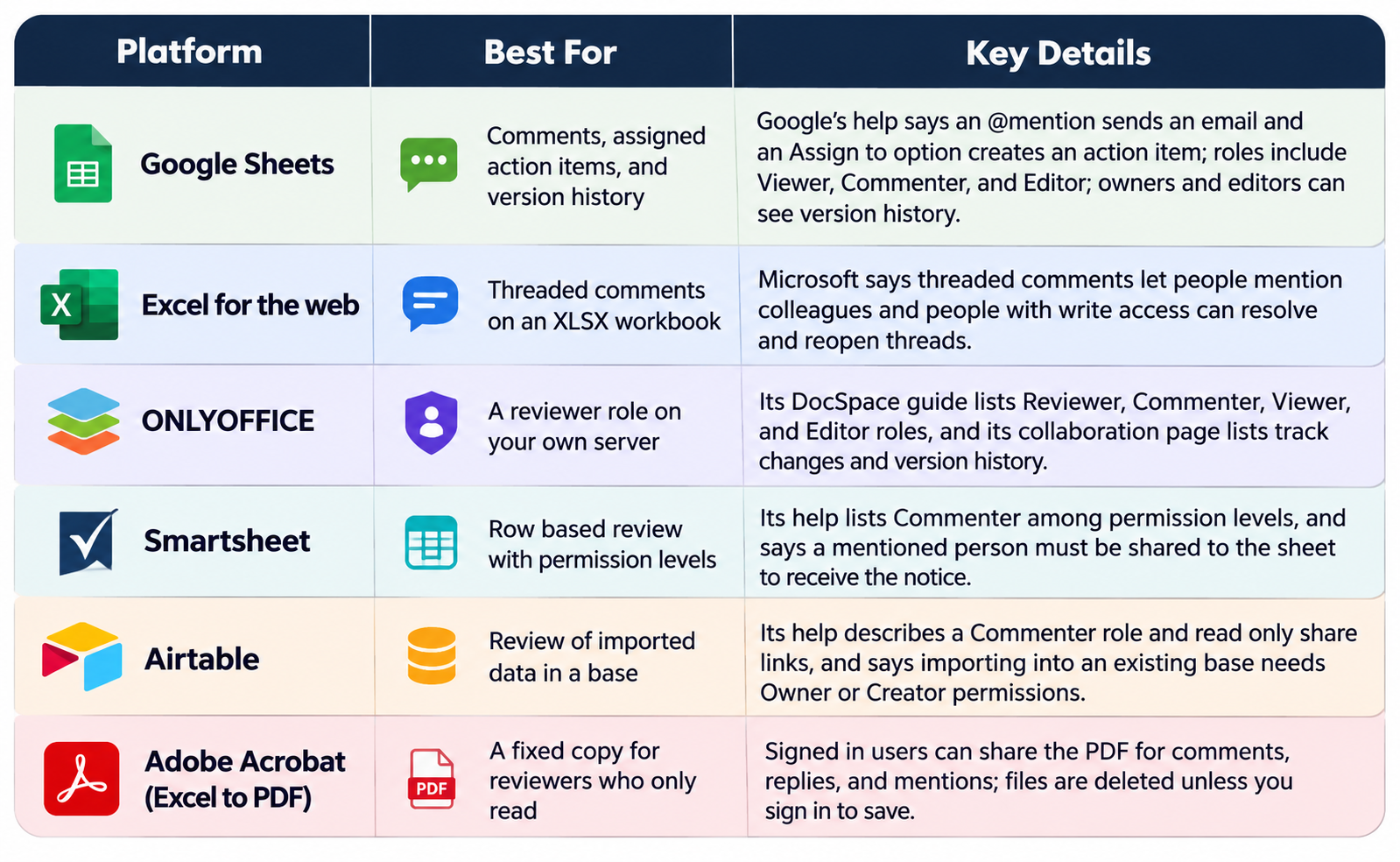
Reviewer versus commenter: ONLYOFFICE’s DocSpace guide describes a Reviewer as someone who can suggest changes and a Commenter as someone who can leave comments.
- Viewer limits: a guide says a Google Sheets viewer can be mentioned but cannot reply or resolve, and Smartsheet says a viewer’s email reply does not create a comment.
- Permission levels: Smartsheet’s help describes five levels, from Viewer up to Admin, so give reviewers the lowest level that lets them comment.
- History: Google’s help says owners and editors can see version history, and Microsoft says version history works for files in OneDrive or SharePoint.
- Link controls: Microsoft’s OneDrive help describes Block download, an expiration date, and a password, and says the password option applies to Anyone links.
Spreadsheet to Web Format for Sharing: HTML Pages, Embeds, and Published Links
You can convert a spreadsheet to a web format by saving it as a web page, publishing it from an online sheet, or embedding a live workbook. Microsoft says Excel can save a workbook or part of one as a static web page in .htm or .html, with an option to republish each time you save. Google’s help says you can publish an entire spreadsheet or individual sheets, then send a new URL or embed it in a site. Published pages are for reading, so keep an editable master.
- Static or live: Microsoft calls the Excel web page option static, and Google’s help says you can stop a published file from republishing by clearing the automatic republish option.
- Formats: Microsoft lists .htm, .html, .mht, and .mhtml as the web page formats for its republish feature.
- Supporting files: Microsoft says Excel creates a supporting folder when you save as .htm or .html, so keep the folder with the page when you upload it.
- Fewer features: a guide quoting Microsoft says fewer Excel features are kept when a workbook is saved as a web page, and recommends keeping the XLSX as the master.
- Choose what to publish: Google’s help says you can review published content and settings and untick tabs you do not want people to see.
- Embed limits: a guide says Microsoft’s embed documentation lists a 10 MB workbook limit and 1,000 concurrent viewers for an Excel for the web embed.
- Privacy: a published page is meant for a large audience, so do not publish sheets that contain personal or confidential data.
Frequently Asked Questions
Is a published spreadsheet page private?
No. Google’s help says publishing a file makes it available for a large audience and lets you send a new URL or embed it in a site, so treat it as public to anyone with the link. Check the published content settings and untick any tab you do not want shown. For private review, share the sheet with named people and a Commenter role instead.
Does a web page keep my Excel formulas?
Not as an editable workbook. Microsoft describes the Excel web page option as static, and a guide says fewer Excel features are maintained when you save as a web page. Readers see results, not working formulas. Keep the XLSX as your master and publish the web page for reading, or use a web app platform if visitors must enter values.
When is a PDF better than a web page for review?
Use a PDF when reviewers must comment on a fixed layout. Adobe’s page says signed in users can share the PDF for comments, replies, and mentions, and a PDF keeps the page breaks you set. Use a web page when many readers only need to look at current data. For tasks that need edits, use a shared sheet with roles.
What do I need to host a workbook saved as a web page?
A web server that can serve the page and its supporting folder. Microsoft says Excel creates a supporting folder of files when you save as .htm or .html, and a guide says you can host the saved page on any web server. Upload the page and the folder together, then open the live address and check that the tables and images appear.
The best online spreadsheet collaboration tools combine an editable shared sheet for the team with a PDF or published page for readers who only review.