
TikTok is one of the most popular platforms for discovering short videos, creative content, tutorials, entertainment, and trending clips. Millions of users watch and share TikTok videos every day. However, sometimes you may want to save a video to your device for offline viewing or personal reference.
TikTokio is an online TikTok video downloader designed to make saving videos simple and convenient. Instead of installing additional software, users can access the downloader through a web browser and paste a TikTok video link to begin the process.
What Is TikTokio?
TikTokio is a web-based tool that helps users download TikTok videos using their video URLs. It is designed for people who want a convenient way to save videos without navigating complicated software or installing a separate application. The basic process involves copying the link of a TikTok video, opening the downloader website, pasting the URL into the provided input field, and selecting an available download option.
Key Features of TikTokio
TikTok Video Downloads
TikTokio focuses on simplifying the process of downloading TikTok videos. Users can copy a video link and submit it through the online downloader.
This eliminates the need to manually search for video files or use complicated applications.
Download Without Watermark
One of the main reasons users look for TikTokio is the possibility of downloading videos without the TikTok watermark. A clean video can be useful when saving your own original content or material you have permission to reuse.
No Software Installation Required
TikTokio works through a web browser, making it convenient for users who prefer not to install extra applications.
You can open the downloader from a compatible browser and follow the download instructions.
MP4 Video Format
MP4 is widely supported across smartphones, computers, tablets, and many media players. Downloading videos in MP4 format makes them easier to store, organize, and play on compatible devices.
Mobile-Friendly Access
Online TikTok downloaders are convenient for mobile users because they can be accessed directly from a smartphone browser. This makes the download process practical for people who regularly browse TikTok on Android or iOS devices.
Simple User Interface
A useful downloader should have a clear input field, an easy-to-understand download button, and minimal unnecessary steps. TikTokio follows the familiar link-based downloader approach, allowing users to complete the process without advanced technical knowledge.
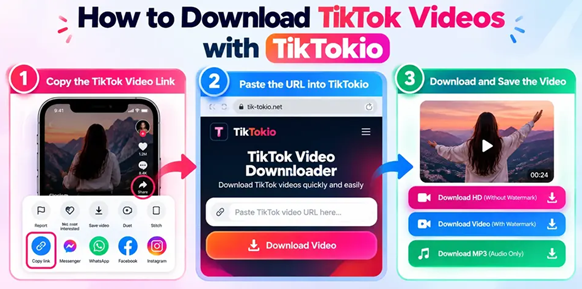
How to Download TikTok Videos Using TikTokio
Downloading a TikTok video generally involves a few simple steps.
Open TikTok
Launch the TikTok application or visit TikTok through your web browser.
Find the public video you want to save.
Copy the Video Link
Tap the Share button on the selected TikTok video.
Choose Copy Link to copy the video's URL.
Open TikTokio
Open your preferred browser and visit the TikTokio downloader website.
Locate the video URL input field on the homepage.
Paste the TikTok URL
Paste the copied TikTok link into the input box.
Make sure the URL is complete and points to the correct video.
Start the Download Process
Select the download or processing button.
Wait while the service attempts to retrieve the available video information.
Choose a Download Option
If the video is supported, select the available MP4 or watermark-free option.
The exact options may vary.
Save the Video
Download the file to your device. Once the process finishes, open your Downloads folder or file manager to locate the saved video.
How to Use TikTokio on Android
Android users can access TikTokio through browsers such as Google Chrome, Firefox, or Samsung Internet.
First, open TikTok and copy the link to the video you want to download.
Next, open the TikTokio website, paste the URL, and follow the displayed instructions.
After downloading, the video will generally appear in the browser's configured download location.
You can use your phone's file manager to find and play the saved MP4 file.
How to Download TikTok Videos on iPhone
iPhone users can also use a browser-based downloader.
Open TikTok, select the video, and copy its link.
Then launch Safari, visit TikTokio, and paste the URL into the downloader.
When the file becomes available, follow Safari's download prompts.
You may find the downloaded video in the Files app, depending on your browser settings.
If desired, you can save a compatible video to the Photos app using the available iOS sharing options.
How to Use TikTokio on PC or Laptop
Downloading TikTok videos on a computer is also straightforward.
Open TikTok in your browser and copy the URL of the selected video.
Visit TikTokio in another browser tab, paste the link, and select the download option.
Once the file is ready, save it to your computer.
The video will typically be stored in your default Downloads folder unless you choose another location.
This method can be convenient for organizing your own TikTok videos or permitted reference material.
Benefits of Using TikTokio
TikTokio offers several potential advantages for users who want a straightforward TikTok downloading experience.
Convenience: The browser-based approach avoids the need for dedicated desktop software.
Device compatibility: Users can access the service from different operating systems through compatible browsers.
Offline viewing: Downloaded videos can be watched later without requiring an active internet connection.
Easy file management: MP4 files can be organized in folders and played through compatible media applications.
Simple process: Copying and pasting a video URL is easier than using complex video-processing tools.
These benefits make link-based downloaders appealing to users who want quick access to videos they are permitted to save.
Common TikTokio Download Problems and Solutions
TikTok Video Link Is Not Working
A copied link may be incomplete, expired, or incorrectly formatted.
Solution: Return to TikTok, copy the video URL again, and paste the complete link into the downloader.
Video Cannot Be Downloaded
Some videos may be private, restricted, deleted, or unavailable to the downloader.
Solution: Check whether the video is publicly accessible and whether downloading is permitted.
Download Is Taking Too Long
A slow internet connection or temporary server problem can delay processing.
Solution: Check your connection, refresh the page, and try again later.
Downloaded Video Cannot Be Found
The file may have been saved to a different location than expected.
Solution: Check your browser's download history and the device's Downloads folder.
Website Is Not Loading
Browser settings, network problems, or temporary service interruptions can prevent access.
Solution: Try another browser, verify your internet connection, or wait until the service becomes available.
Is TikTokio Safe to Use?
Safety depends on the website you visit and how you use it.
Avoid websites that request your TikTok password, unnecessary personal information, or suspicious browser permissions.
A basic video downloader generally does not need access to your TikTok account credentials.
Be cautious with misleading advertisements, unexpected downloads, and unfamiliar file types.
It is also important to respect creators' rights. Download videos you own, videos shared with permission, or content you are otherwise authorized to save. Do not repost someone else's work without the necessary permission.
Frequently Asked Questions
What is TikTokio used for?
TikTokio is used to download eligible TikTok videos through a web browser by copying and pasting their video links.
Can TikTokio download videos without a watermark?
Watermark-free downloads may be available for supported videos, depending on the downloader's current functionality.
Do I need to install TikTokio?
A browser-based version does not normally require separate software installation.
Does TikTokio work on Android?
Yes, Android users can access browser-based TikTok downloaders through compatible mobile browsers.
Can I use TikTokio on an iPhone?
Yes, iPhone users can access the service through Safari or another compatible browser and save supported files.
Can TikTokio download private TikTok videos?
Private or restricted videos may not be accessible. Users should respect the creator's privacy settings and download permissions.
Where are downloaded TikTok videos saved?
Files are usually saved in the browser's configured download folder. The exact location depends on your device and browser settings.
Conclusion
TikTokio provides a convenient way to download eligible TikTok videos using a simple link-based process. Its browser-friendly approach can make downloading easier for Android, iPhone, and computer users.
With features such as MP4 downloads, potential watermark-free options, and access across different devices, TikTokio can be useful for offline viewing and managing videos you have permission to save.